If you've ever tried to build a website and quit halfway through because it felt like you needed a computer science degree just to change a button color — this post is for you.
WordPress powers over 40% of the internet. It's the platform. But WordPress out of the box is like getting handed a blank canvas and a full palette of paints with no brushes. You need a builder — and the one that has consistently outpaced the competition for over a decade just got its biggest upgrade ever.
Divi 5 is a complete overhaul of the page builder's core technologies, redesigned from the ground up by its creator, Elegant Themes. Internally, it's referred to as the "Foundation Update" — and Elegant Themes describes it as "fast, lean, and packed with modern features to lead the next generation of page builders." WPMarmite
This is a consumer's guide to what Divi 5 actually is, what it does, who it's for, and whether the price tag is worth it. The short answer: for most people building a serious website on WordPress, it's the best option on the market right now. Let's walk through why.
What Is Divi 5, Exactly?
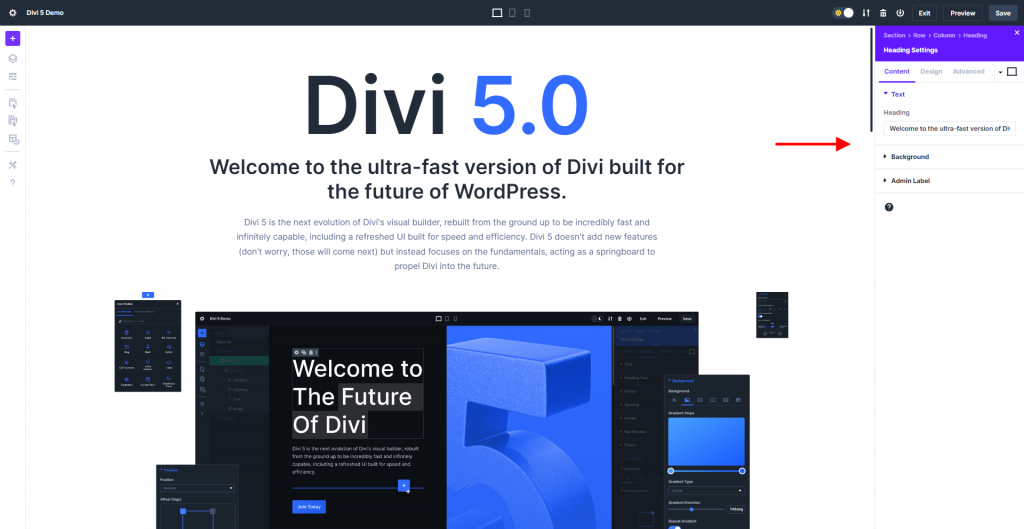
Divi is a WordPress theme and visual page builder made by Elegant Themes. It lets you design and build your entire website — pages, blog layouts, headers, footers, product pages, everything — using a drag-and-drop visual editor. You see your changes in real time, on the actual page, without touching a single line of code.
Divi 5 now supports complete site editing in the builder, allowing you to edit your header, footer, body layouts, and page content at once. Your entire site, from top to bottom, can be edited in a single step. Elegant Themes
That's a meaningful improvement from how page builders have traditionally worked — where editing your header meant exiting the page editor, going into a separate template manager, making changes there, saving, going back, and hoping it looked right. Divi 5 collapses all of that into one continuous editing experience.
Who Is Divi 5 For?
The honest answer is: almost anyone building a website on WordPress who doesn't want to write code. That includes:
Bloggers and content creators building their first professional site and wanting it to look like they paid a designer thousands of dollars — without actually doing that.
Small business owners who need a service site, a portfolio, or an e-commerce store and don't have the budget to hire a developer for every update.
Freelancers and agencies who build websites for clients. Divi's unlimited site licensing makes it especially cost-efficient for anyone building more than two or three sites per year.
DIY site builders who want genuine creative control — not the watered-down template-shuffling that platforms like Squarespace and Wix offer.
If you fall into any of those categories, keep reading.
The Pros: Here's What Makes Divi 5 Worth It
1. The Visual Builder Is Genuinely Intuitive
Divi's drag-and-drop functionality with real-time on-canvas editing lets you build your website visually without touching a single line of code. It's never been easier to make your website look perfect on every screen. Elegant Themes
What this means in practice: you click on a text block to edit it. You drag a section to move it. You see your colors, fonts, and spacing update live. There's no saving-and-previewing loop. The canvas is your website.
For someone coming from a traditional WordPress setup — where you'd write in one view and preview in another — this feels like a fundamentally different experience. For someone coming from Wix or Squarespace, it feels like the grown-up version of what those platforms were trying to be.
[Image: Divi template library showing professionally designed layout options]
2. The Performance Leap Is Real
This is the upgrade that separates Divi 5 from Divi 4 most dramatically — and it matters for your blog's SEO and user experience.
Divi 4 typically loaded in 2.6 seconds on mobile and scored 84 on Google PageSpeed Insights. Divi 5's modern codebase delivers scores of 99 on mobile and a perfect 100 on desktop. GTmetrix performance tests show Divi 5 scoring 96% overall with pages loading in just 1.3 seconds. Wp Builder Lab
For context: Google uses page speed as a ranking signal. A 1-second improvement in load time is not cosmetic — it directly affects where your content shows up in search results and whether readers stay on the page after they arrive. Getting from a PageSpeed score of 84 to 99 is not an incremental improvement. It's a category jump.
3. The Design System Puts You in Control
Divi 5's design system lets you define global colors, numbers, images, and more for design consistency. Create class-based presets for common styles to use across your website — when you update a preset, it updates throughout your entire site. Elegant Themes
In plain English: you define your brand colors, fonts, and style decisions once. Every element across your entire site updates from that single source of truth. Change your primary color from blue to green and it updates everywhere — buttons, headings, links, accents — in one click.
This is how professional designers work. Divi 5 puts that system in the hands of someone with no design background and makes it feel natural.
4. Responsive Design Across Every Device
Divi 5 introduces finer responsive management, with seven predefined responsive breakpoints that cover all device types — desktop, smartphone, tablet — accessible by simply clicking the desired screen size without navigating through multiple menus. WPMarmite
Over 60% of web traffic is mobile. A site that looks great on a desktop but breaks on a phone is a site that's losing readers. Divi 5 makes responsive design a front-and-center part of the building experience rather than an afterthought.
5. The Template Library Gives You a Serious Head Start
Premade layouts and Quick Sites dramatically accelerate project timelines, while global presets and the expanded Divi Library enable consistent design implementation across entire websites. Wp Builder Lab
Starting from scratch with a blank page is intimidating and unnecessary. Divi ships with hundreds of professionally designed full-page layouts and complete site templates you can install with one click and customize to match your brand. For a blogger launching a site, this means going from "I have a hosting account" to "I have a real website" in an afternoon.
[Image: WordPress no-code drag and drop builder in action]
6. WooCommerce Integration for Anyone Selling Online
If you're running an online store, selling digital products, or taking bookings, Divi's WooCommerce integration is a genuine differentiator. The WooCommerce integration offers complete control over product displays, checkout processes, and shopping cart functionality through dedicated modules that seamlessly incorporate dynamic product data. Wp Builder Lab
Most page builders treat e-commerce as an afterthought. Divi treats it as a first-class feature.
7. Divi AI: Built-In Content and Design Assistance
For members on the Pro plan, Divi AI lets you build layouts, write content, generate images, and write code from right inside the builder. Elegant Themes If you're staring at an empty section wondering what to put there, Divi AI can generate a starting point — a headline, a layout structure, a call-to-action — that you then customize. It's not magic, but it removes the blank-page paralysis that slows down new site builders.
8. The Community and Support
Divi's support resources have expanded alongside the platform, with comprehensive documentation, video tutorials, and a thriving community of over 800,000 members. The 24/7 live chat support ensures help is always available. Wp Builder Lab
Having a question about how to do something in Divi is almost never a dead end. Between the official documentation, the YouTube tutorials, the active Facebook community, and 24/7 live chat support, the answer to virtually any Divi question is findable within minutes.
9. Gutenberg Compatibility — Playing Well With WordPress
One of the legitimate criticisms of older page builders was that they created "walled garden" content — content locked inside the builder's proprietary format that would look broken if you ever switched. Divi 5 addressed this directly.
Divi 5 saves content in a block-based format, opening up new possibilities for Gutenberg cross-compatibility, strengthening the interaction between the native WordPress editor and Divi 5. WPMarmite
This matters for long-term site health. Your content stays more portable, and the builder works with WordPress rather than around it.
The Cons: Where Divi 5 Isn't Perfect
No honest review skips this section. Here's what's worth knowing before you buy.
The Dashboard Has a Learning Curve
Divi 5 is powerful. That power comes with surface area. While Divi 5's learning curve remains steeper than some competitors, this reflects its extensive capabilities rather than poor user interface design. Wp Builder Lab A first-time user will spend a few hours getting oriented. There are YouTube tutorials for virtually every task, and the community is helpful — but expect to invest a couple of days before things feel second nature.
Third-Party Plugin Compatibility Is Still Catching Up
Because Divi 5 is a full architectural rebuild, some third-party plugins and child themes built for Divi 4 needed updates to work properly with the new version. Elegant Themes has committed to supporting Divi 4 for at least the next 12 months, and longer if practical, while continuing to fix security and compatibility issues with new WordPress versions. Elegant Themes If you rely heavily on specific Divi 4 plugins or child themes, check their compatibility before migrating.
The Price Is Higher Than Entry-Level Builders
Let's be direct: Divi costs more than using a free WordPress theme with the native Gutenberg editor. The annual plan is $89/year. The lifetime plan is $249 one time. The Pro plan (which adds Divi AI, cloud storage, and priority support) runs $277/year or is available as a bundle.
Compared to Squarespace ($16–$49/month), Wix ($17–$159/month), or Elementor Pro ($59–$399/year), Divi is not expensive. But it costs more than nothing, and some beginners hesitate at that initial spend.
Here's the frame that matters: the lifetime option at $249 is exceptional value. Unlimited websites, lifetime updates, lifetime support — paid once. For anyone building more than two sites, running a business, or planning to use WordPress for years, the math is straightforward. You spend $249 once instead of $89 every year indefinitely.
Divi 5 vs. The Competition
| Divi 5 | Elementor Pro | Squarespace | Wix | |
|---|---|---|---|---|
| Platform | WordPress | WordPress | Proprietary | Proprietary |
| Annual cost | $89/yr | $59–$399/yr | $192–$588/yr | $204–$1,908/yr |
| Lifetime option | ✅ $249 | ❌ | ❌ | ❌ |
| Unlimited sites | ✅ | ❌ (per site) | ❌ | ❌ |
| PageSpeed score | 99–100 | Varies | Limited control | Limited control |
| You own your content | ✅ | ✅ | ❌ | ❌ |
| 24/7 support | ✅ | ✅ (Pro+) | ✅ | ✅ |
The "you own your content" row is worth dwelling on. With Squarespace or Wix, your site lives on their platform. If they raise prices, change terms, or shut down, your site goes with them. With WordPress + Divi, your content lives on your hosting account. It's yours.
The Lifetime Plan: Why It Deserves Its Own Section
The Divi lifetime license at $249 is one of the most talked-about things in the WordPress community — and for good reason. Most software in 2026 has moved entirely to subscription models. Divi offering a "pay once, use forever" option is genuinely unusual.
What you get with the lifetime plan: full access to Divi on unlimited websites, lifetime updates as the product continues to evolve, and lifetime support access. No annual renewal. No price increases. No subscription to cancel.
For a blogger who plans to build one site and use it for years, this breaks down to less than the cost of a few months of a competing platform. For a freelancer or agency building multiple client sites, it's even more obvious. The math on the lifetime plan is difficult to argue against once you plan to use Divi for more than three years.
Is Divi 5 Right for You?
Yes, if:
- You're building a serious blog, portfolio, or business site on WordPress
- You want professional design results without hiring a developer
- You're planning to use WordPress long-term (the lifetime plan makes this a no-brainer)
- You're building multiple sites or manage client sites
Take more time to evaluate, if:
- You're brand new to WordPress and want the absolute simplest possible learning curve (in that case, start with a simple theme and migrate to Divi once you're comfortable with WordPress basics)
- You have a heavily customized Divi 4 setup with specific third-party plugins — verify compatibility before migrating
How to Get Started
- Get WordPress hosting (Bluehost, SiteGround, or Kinsta all work)
- Install WordPress (most hosts do this in one click)
- Purchase Divi at elegantthemes.com — choose annual if you want to test the waters, lifetime if you're committed
- Install Divi, pick a starter template, and start customizing
The 30-day money-back guarantee means there's no real risk. Try it for a month on a real project. If it doesn't click, get your money back.
Conclusion
Divi 5 isn't just the best version of Divi — it's a legitimately competitive answer to the question of how ordinary people build professional websites in 2026. The performance numbers are real, the design system is powerful, the template library removes the intimidation factor, and the lifetime pricing model is one of the best deals in the WordPress ecosystem.
The learning curve is real. The price is higher than free. But for a tool you'll use to build and grow an online presence that earns real income, neither of those things is actually a reason not to buy it.
Citation
- WP Builder Lab, "Divi 5 in 2025: Is it Still the Best WordPress Builder?", WPBuilderLab.com — source for performance benchmarking data comparing Divi 4 and Divi 5 PageSpeed scores, GTmetrix results, and pricing structure details.
- Nick Roach / Elegant Themes, "Divi 5 Official" (February 26, 2026), ElegantThemes.com — official launch post by the Elegant Themes CEO confirming Divi 5's exit from beta, Divi 4 continued support commitment, and forward development roadmap.
This post contains affiliate links. If you purchase through these links, I may earn a commission at no additional cost to you.